
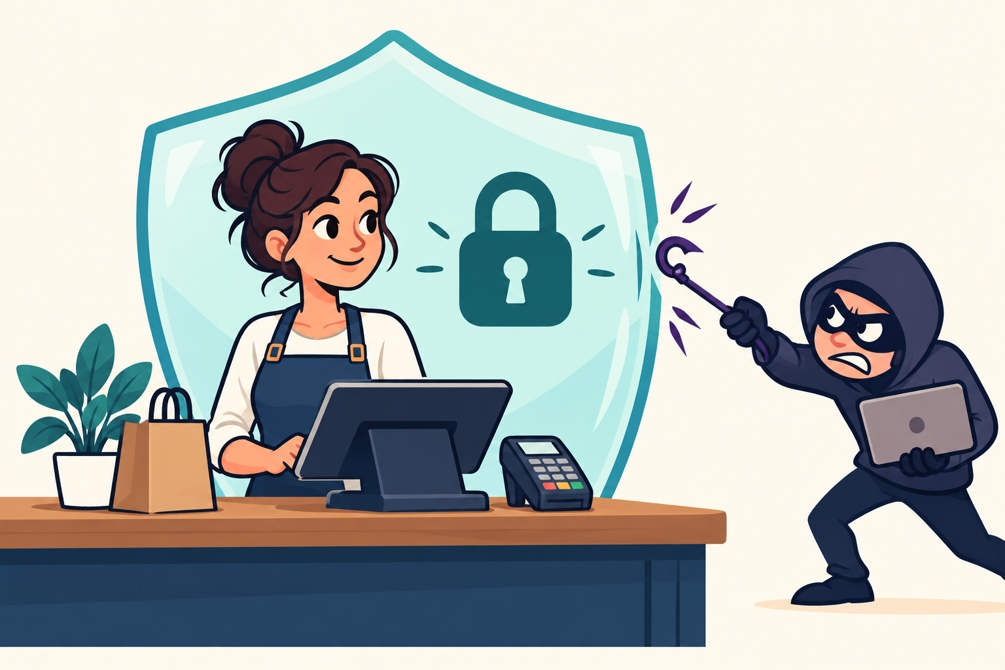
The lunch rush is starting when you get a call from your payment provider. There’s a problem with the terminal, they say, and an update needs to happen immediately. Could an employee install a support tool and read back the code?
You don’t recognize the number, but the caller sounds professional. They know which system you use. They’re also handing your business a choice: slow down to verify the request, or let a stranger into the computer that helps run your store.
That call could be from anywhere in the world and still seem completely legit. In 2026, it might not even be human. Merchants are constantly facing these kinds of cybersecurity decisions, while threats get more sophisticated.
When we covered customer data security in 2022, protecting privacy and earning trust were central themes. They still are, but as payments connect to more of the business, merchants need to look beyond the transaction itself. Secure checkout depends on the accounts, software, and everyday decisions surrounding it.
The threats are changing fast, even over the past four years, so let’s cover how to stay safe in 2026.
Picking the Lock
Often, cybersecurity incidents are more about human error than computer code. It’s much easier to get somebody to open the door for you, such as through a phishing attack, than to find vulnerabilities in a secure system.
However, it’s never been easier to be a hacker than in 2026. With the help of LLMs and other modern tools, more hacks are happening without any human in the loop.
Verizon’s 2026 Data Breach Investigations Report found that software vulnerabilities were the starting point for 31% of breaches, overtaking stolen credentials. Ransomware appeared in 48% of breaches. Other reports tell the same story: Direct software hacks are making a comeback.
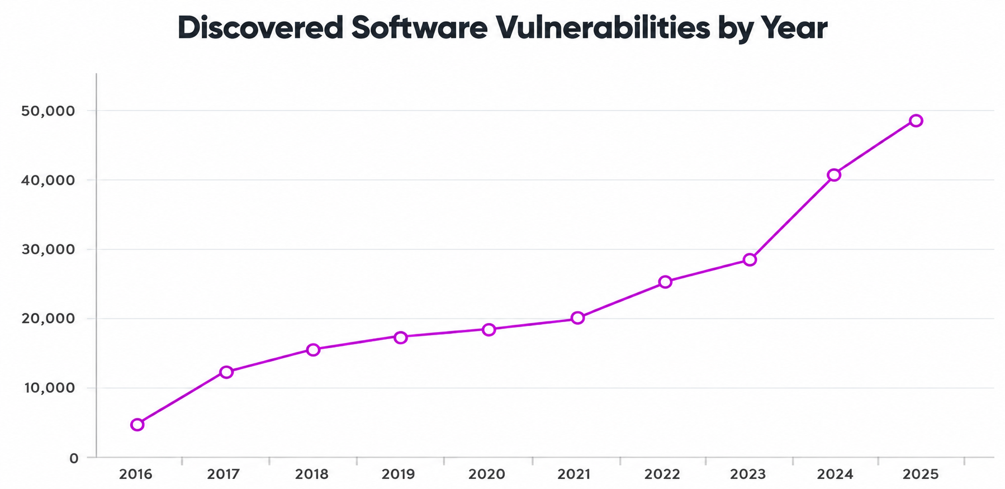
Discovered Software Flaws: Exploding thanks to AI
Source: ZeroThreat
To protect access, you should be seeing regular system updates as new techniques emerge, which is getting exponentially more frequent. As you may have seen in the news, AI is helping to expose software vulnerabilities, leading to an explosion in discoveries since 2022.
You need a reliable payment partner to constantly scour published vulnerabilities and make the necessary patches.
Going for the Keys
The old advice to watch for sloppy grammar still helps, but a convincing message can sail right past that test. The FBI has documented impersonation campaigns using AI-generated voice messages, making familiar voices another thing businesses should verify before acting.
For merchants, that means giving employees a clear rule for sensitive requests. A caller asking for remote access, a login code, or a change to banking details should trigger independent verification. Call back using the number already on file or published through a trusted source.
Apply the same discipline to emails announcing new payment instructions. A familiar supplier’s name (or even voice!) doesn’t establish that the request is authentic.
Training should use situations employees actually encounter: a fake processor notice, an urgent invoice, a supposed manager asking for a transfer. Make it easy to pause and ask for help. An employee who flags a suspicious request should feel supported, especially when there’s a line of customers waiting.
Give Every Login a Job Description
“Everybody Uses the Owner’s Password” is not a security policy; it’s an invitation. Shared logins are convenient right up until you need to know who issued a refund, changed an account setting, or moved money out of the master account.
Use individual accounts wherever the system supports them, and only give employees the access their work requires. A cashier may need to accept payments, but not change deposit instructions. Remove access promptly when someone leaves, including accounts held by outside contractors.
Check the settings that can move money, too. Changes to settlement accounts, unusual refunds, and new administrator access deserve closer review. If your platform offers alerts or approval steps for these actions, ask how to configure them. Review permissions periodically, especially after changing roles or adding a location.
Your provider should be there to help explain the available permissions.
Know Who Maintains the Connections
Online ordering, loyalty programs, accounting integrations, and remote support can all make a business easier to run. They also create connections somebody needs to maintain.
Keep a simple inventory of the systems you use and who supports each one. Identify who installs updates, who can connect remotely, and who receives security alerts. Remove integrations you no longer need. For software you manage directly, try to enable automatic security updates.
Online checkout deserves special attention. The PCI Security Standards Council warns that scripts running in customers’ browsers are a significant target for attackers seeking payment data. Its guidance addresses authorizing payment-page scripts, checking their integrity, and monitoring for tampering.
Ask your website provider and payment partner which protections and compliance responsibilities apply to your checkout setup.
Plan for the Morning Something Breaks
Prevention matters, but a recovery plan answers the question every owner eventually asks: how do we get back to work?
NIST recommends backing up business data, protecting those backups, and testing them. Confirm what your cloud providers retain, how restoration works, and which records need separate protection.
Remember that restoring files and restoring trust are different jobs. Customers may need accurate information about affected services or data. Decide who will communicate, and get qualified help assessing your obligations.
Write down who employees should contact when they suspect an incident, including your IT support and payment provider. Keep those details accessible if email or the main computer is unavailable.
Walk through a realistic scenario. If the ordering system is unavailable on Saturday, which services can continue safely? What will staff tell customers?
Have your provider explain approved payment contingencies before the outage. If they can’t do that, it’s time for a new one!
COCARD: Helping Merchants Ask the Right Questions
Merchants shouldn’t have to become cybersecurity specialists to accept a payment. They do need a partner who can explain what their payment system protects, which responsibilities remain with the business, and where to turn when something looks wrong.
COCARD helps merchants explore payment and POS solutions around the way they operate. Security should be part of that conversation from the start, including available access controls, PCI compliance responsibilities, and support for the systems being deployed.
Ask us to walk through your current setup. Where do employees sign in? Which tools connect to checkout? Who handles updates, and who picks up the phone when you need help?
Get in touch today to discuss payment solutions that help protect your customers and keep your business moving.